Buyer’s guide
Virtual Fitting Room Software: How Fashion Retail Stores Can Transform Customer Shopping Experiences
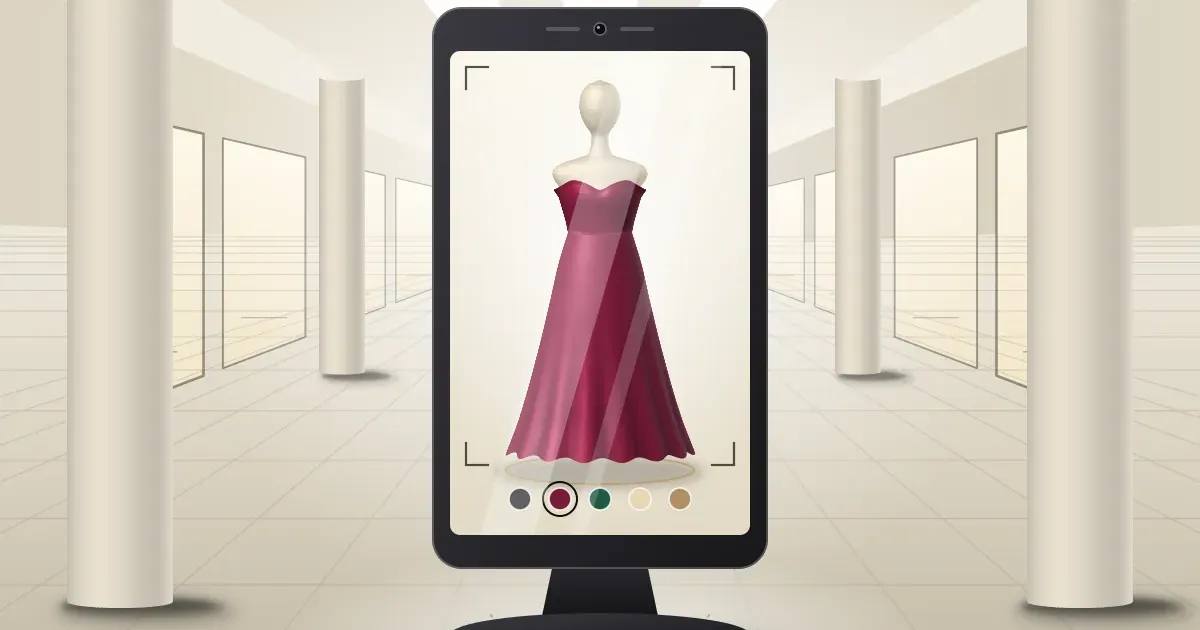
On a busy Saturday, a clothing store has the same problem in every city: more customers want to try pieces than there are trial rooms, and staff spend the day fetching, unfolding and re-folding. Virtual fitting room software gives those customers a faster first step. They see a garment on themselves on a screen, then decide what is worth carrying to the trial room.
This guide is for store owners and retail decision-makers in India who are comparing options. It explains what the software does, which features matter on a physical shop floor, how to implement it, and what to ask a vendor. Statements about Kannaadi.Ai reflect what the company publishes on its website.
What Is Virtual Fitting Room Software?
Virtual fitting room software shows a chosen garment on the customer digitally, so they can judge colour, silhouette and style without changing clothes. You will also see it called virtual try on software or a digital fitting room. For a retailer, it is a customer-facing tool that sits alongside your trial rooms, not instead of them.
Two different things are sold under this name. One builds a 3D avatar from body measurements. The other, which this guide focuses on, shows the garment on an image of the actual customer. Ask any vendor which one they offer, because the shop-floor experience is very different.
If you want the consumer-side explanation, our virtual fitting room technology explainer covers it. This article is about choosing and running the software in a store.
Why Fashion Retail Stores Are Adopting Virtual Fitting Room Technology
Fashion is a visual purchase, and a physical store carries a lot of effort to support it. Fashion retail technology that makes choosing easier is attracting attention for a few practical reasons:
- Customers want to compare more than they can try. A screen lets them look at several pieces and colours in a short time.
- Shoppers already compare on their phones. A store needs something interactive that a phone cannot offer in the aisle.
- Stores want a modern, memorable shopfront. An AI kiosk for fashion stores gives passers-by a reason to step in.
- Staff time is limited. If customers narrow their choices first, conversations can start from pieces they already like.
These are potential benefits, not guarantees. The result in your store depends on your range, footfall, layout and how your team uses the tool.
Common Challenges in Traditional Fashion Retail Shopping
- Limited trial rooms. Only so many customers can try garments at once, so busy periods create waiting.
- Heavy handling. Staff carry pieces back and forth. Unfolding a saree or a heavily worked lehenga for a customer who is only browsing is a real cost.
- Visualisation gaps. Customers cannot always picture how a colour or cut will look on them, so they leave to think about it.
- Limited time per customer. In a multi-brand store, staff cannot personally style every browsing customer.
- Adding technology to an existing store. Space, power, connectivity and staff habits all need planning.
How AI-Powered Virtual Fitting Rooms Work
AI virtual try-on for retail follows a simple pattern. Exact steps vary by vendor, but a walk-up, in-store flow generally looks like this:
- The customer steps up to a kiosk or screen. An on-screen guide shows where to stand.
- The system captures the customer. The camera on the kiosk provides the image of the person.
- The customer picks a garment. It comes from the range set up for your store, or from a scan or an uploaded photo.
- AI shows the garment on the customer. The preview appears on screen.
- The customer switches pieces, colours and looks. They keep exploring until they find what to try physically.
A preview is a visual guide to colour, shape and style. It does not measure the customer or guarantee fit, and it cannot reproduce fabric weight or drape exactly. Fittings, measurements and final advice stay with your team.
Key Features to Look for in Virtual Fitting Room Software
Use this list to compare vendors. The items below are the ones Kannaadi.Ai publishes on its website, so you can check them against any shortlist.
AI-powered virtual try-on on the customer
The core feature is the garment shown on the customer instead of a model. This is the difference between a fitting-room experience and a lookbook.
A real-time, mirror-like experience
The preview should respond as the customer moves and switches pieces. A screen that makes people wait feels like a loading page, and customers walk away.
An interactive kiosk experience
On the shop floor, you want a self-guided kiosk: an attract screen, an on-screen guide for where to stand, and tap-to-switch colours and looks. It should be possible to brand it to your store or campaign.
Ways to bring a garment in
Choosing from your range is the baseline. Scanning a piece from the rail, or uploading a photo of a dress the customer has in mind, connects physical stock and customer ideas to the screen.
Outfit suggestions
AI Looks suggests how pieces come together around a garment the customer has chosen, so one try-on can turn into several ideas. For a deeper checklist, see our guide to the AI outfit generator for fashion stores.
Share-ready looks
The experience can end with a look the customer can take away and share. Campaigns can also add a lucky-draw reward.
Virtual Fitting Room Software for Different Retail Businesses
Clothing stores
Virtual try-on for clothing stores works best where customers browse a lot and try little. A kiosk near the entrance or the main rail wall lets them narrow choices before they join the trial-room queue. See the fashion stores page.
Boutiques
A boutique wins on personal styling. A digital fitting room can support that by giving the shopper something to explore while the stylist attends to another customer, without replacing the stylist’s advice. See the boutiques page.
Saree and ethnic wear shops
Showing every saree means unfolding and draping it. Previewing colour, border and pallu on the customer first means staff unfold the pieces the customer is already interested in. See the saree and ethnic stores page.
Fashion showrooms
Large showrooms have many categories and floors. A kiosk gives customers a quick way to explore a new collection, and a single focused launch range is easier to manage than the whole catalogue.
Multi-brand retail stores
Multi-brand stores need a way to help customers compare across labels. A shared kiosk can be set up around the range you choose. Mall and flagship formats are covered on the shopping malls page.
How to Implement a Virtual Fitting Room in Your Physical Store
- Define the problem. Is it trial-room queues, slow browsing or a quiet shopfront? The answer decides where to place the kiosk.
- Start with one category. Pick the range where choosing is hardest, such as sarees, occasion wear or a new collection.
- Choose the spot. Walk the floor at a busy hour. Entrance, rail wall and trial-room approach each serve a different purpose.
- Plan space and hardware. Check floor space, lighting, power and internet at the chosen spot.
- Check your existing systems. If you use billing or POS software, ask how the vendor would work alongside it instead of assuming a connection.
- Brief your staff. They should invite customers to try it and use the preview as a conversation starter.
- Handle privacy. Tell customers how their image is used, and ask the vendor how it is stored and deleted.
- Review against your own baseline. Compare store behaviour before and after instead of relying on someone else’s numbers.
Our smart retail solutions guide places this step in a wider rollout plan.
Virtual Fitting Room Software vs Traditional Trial Rooms
The two serve different jobs, which is why most stores use them together.
| Factor | Virtual fitting room software | Traditional trial room |
|---|---|---|
| What it shows | A visual preview of colour, silhouette and style on the customer | The real garment on the customer, including fit and fabric feel |
| Changing clothes | Not needed | Needed for each piece |
| Staff involvement | Customer can explore on their own first | Staff usually fetch, hold and re-fold pieces |
| Space | A kiosk or screen on the floor | A dedicated, private room |
| Capacity at one time | Depends on the number of screens and the pace of use | Limited by the number of rooms |
| Fit and measurements | Not a measurement tool; the team advises on fit | The final check of fit |
| Best role | Narrowing down what to try | Confirming what to buy |
Why Choose Kannaadi.Ai for Your Fashion Retail Store?
Kannaadi.Ai is a fashion technology company that builds AI virtual try-on for retail, with physical stores as a main use. According to its website:
- Garments are shown on the customer, not on a model.
- A walk-up kiosk with an attract screen, an on-screen guide for where to stand and tap-to-switch colours and looks, brandable to your store or campaign.
- Scan or upload a dress. Customers can bring in a piece from the rail or from a photo.
- AI Looks for outfit ideas around a chosen piece.
- Share-ready looks and a lucky draw for campaigns and in-store promotions.
- Built for retail formats: clothing showrooms, boutiques, saree and ethnic wear shops, bridal stores, men’s and women’s fashion stores and multi-brand retailers.
Hardware, placement, scope and integration are agreed in a demo, based on your space and range. Kannaadi.Ai does not publish pricing or POS integration details, so treat those as questions to ask. Business benefits depend on your store and are not promised in advance.
How to Get Started with Kannaadi.Ai
A short preparation makes a demo more useful:
- Pick a focused set of pieces, such as one collection or category.
- Decide where a kiosk could stand and note the space, power and internet there.
- List your goals: shorter queues, more engaging browsing, a campaign or a new-collection launch.
- Bring your questions about images, privacy and your billing system.
Then book a demo, contact the team or enquire about Kannaadi.Ai for your store on WhatsApp). The team will show virtual fitting room software working with pieces like yours and discuss what a rollout involves.
Frequently Asked Questions
What is virtual fitting room software?
It is software that shows a chosen garment on the customer digitally, so they can see colour, shape and style without changing clothes. It helps customers narrow down what to try physically.
How does AI virtual fitting room software work?
It takes an image of the customer, for example from a kiosk camera, and an image of the chosen garment, then uses AI to show the garment on the customer. Customers can then switch pieces and colours. Details differ by vendor.
Can virtual fitting room software be used in physical clothing stores?
Yes. It can run on a kiosk or screen on the shop floor, next to your trial rooms. Which categories to launch with, and where to place the screen, depend on your store.
How can boutiques benefit from virtual fitting room technology?
It gives shoppers something to explore while the stylist attends to others, and it can start a styling conversation from a look the customer has already seen. Styling advice stays with your team.
What features should I look for in virtual fitting room software?
Look for try-on on the customer, a responsive real-time feel, a walk-up kiosk flow, ways to bring in garments (range, scan or upload), outfit suggestions and share-ready looks. Also ask about image privacy, hardware and how it works with your existing systems.
Can virtual fitting room software work on an in-store kiosk?
Yes. Kannaadi.Ai offers a walk-up kiosk experience with an on-screen guide, tap-to-switch colours and looks, and branding for your store or campaign.
How can fashion retailers implement a virtual fitting room?
Start with one category, choose a high-footfall spot, check space, power and connectivity, brief your staff and agree how images are handled. Then review results against your own baseline.
How can I get virtual fitting room software for my fashion store?
Book a demo or contact the Kannaadi.Ai team through the contact page. You will see the software working with pieces like yours and agree scope, hardware and placement.
Conclusion
Virtual fitting room software will not replace your trial rooms or your staff. It helps customers decide what is worth trying, makes the shop floor more interactive and gives your team a better starting point for conversations. If you are evaluating virtual fitting room software for your store, discover virtual fitting room technology with Kannaadi.Ai or book a demo to see it with your own range.